Smart Follow User Guide
Smart Follow kit user guide, covering remote controller operation, follow distance parameters, radar obstacle avoidance, forced takeover, and detailed operating instructions.
User Guide
1. Feature Overview
When Smart Follow is enabled, the vehicle automatically follows the position of the controller (watch), supporting auto steering, on-the-spot U-turns, and intelligent radar obstacle avoidance. It also includes one-touch remote takeover and emergency braking for safe operation. It is recommended to use follow mode at low speed.
2. Remote Controller Operation
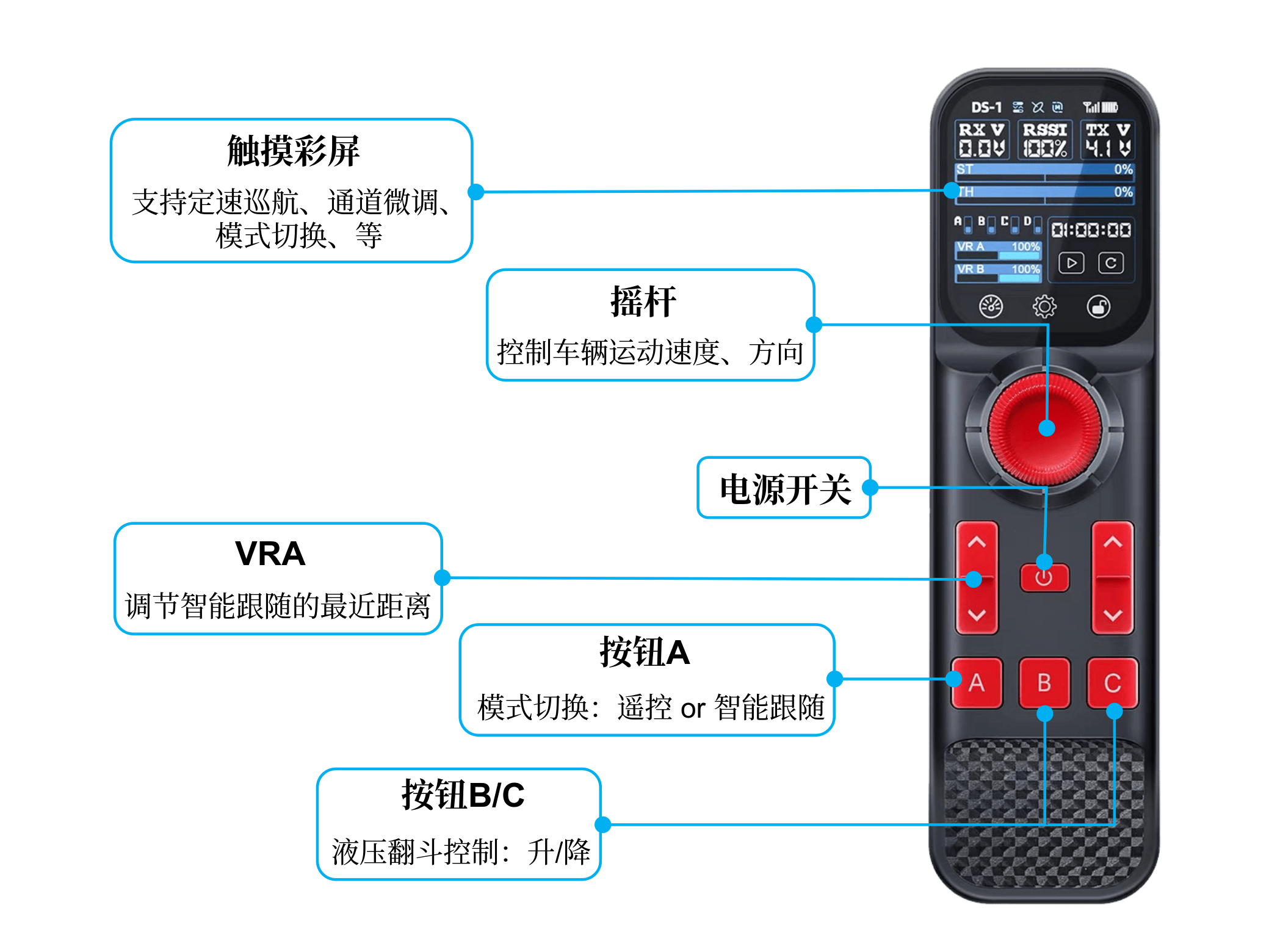
VRA Button
Adjusts the minimum follow distance. Factory default is 2 m, adjustable range is 0.3 m ~ 2 m.
One-Touch Takeover Button
Instantly switches mode in emergencies — the remote controller forcibly takes over vehicle control, supporting emergency braking.
3. Follow Distance Parameters
1. Effective follow range: 0.3 m ~ 7 m - Distance < 0.3 m: vehicle stops automatically - Distance > 7 m: vehicle stops automatically 2. Minimum follow distance setting: factory default is 2 m, adjustable via the VRA button on the remote controller (range 0.3 m ~ 2 m)
4. Steering & U-Turn Logic
The vehicle automatically steers according to the target bearing of the controller (watch). When the target is behind the vehicle and the distance is between 2 m and 7 m, the vehicle performs an automatic on-the-spot U-turn.
5. Intelligent Radar Obstacle Avoidance
- Hardware: comes with 4 radar units, installable on the front and/or rear of the vehicle (recommended to install all on the front). - Trigger logic: when an obstacle is detected within 1.2 m ahead, the vehicle stops immediately and emits a continuous beeping alarm. Once the obstacle is cleared and no obstacle has been detected for 3 consecutive seconds, the vehicle automatically resumes following.
6. Forced Control Takeover
In emergencies, when the vehicle encounters impassable terrain, or when manual stop/steering/reversing is needed, you can use the remote controller to instantly switch modes and forcibly take over vehicle control.
7. Important Tips
- Use follow mode at low speed for improved driving safety
- One-touch remote takeover is always available in follow mode as a safety fallback
- Radar is only an assistive aid and cannot handle all scenarios — take manual control in advance on complex terrain